
An IP address (Internet Protocol address) is a numerical label assigned to a device’s network connection so that data knows where to go and where to send the reply.
Here’s what one looks like:
203.0.113.45
That’s an IPv4 address: four numbers, each from 0 to 255, separated by dots. (This one comes from a block the internet’s standards body reserves for examples, so it isn’t anyone’s real address — we use those throughout this guide on purpose.)
Every time you load a page, send a message, or stream a show, your data travels in small chunks called packets. Each packet is stamped with two IP addresses — where it came from and where it’s going — so the routers in between can pass it along, and so the answer can find its way back to you.
Quick answers:
- What’s my IP? Search “what is my IP” for your public IP, or check your device’s Wi-Fi settings for your private IP. Jump to how to find yours.
- Why do my phone and laptop show different IPs? Because inside your home each device has its own private address, while they all share one public address. Jump to public vs private.
- Can someone find my house with it? Not from the IP address alone. Jump to what it reveals.
The postal-address analogy (and where it breaks)
The classic way to explain an IP address is a mailing address. A letter needs a “to” address so the post office can deliver it and a return address so the reply can come back. An IP address does the same job for internet data.
The limit: an IP address identifies a network connection, not a person, and not an exact house. Your phone gets a different IP on cellular than it does on your home Wi-Fi, a laptop plugged into Ethernet and Wi-Fi has two, and a whole household usually shares one public IP.
How does an IP address work? (4 simple steps)
- Your device joins a network. You connect your laptop to Wi-Fi, plug in a game console, or a smart speaker or bulb joins your home network.
- It gets an address — usually automatically. Your router hands it an IP address using a system called DHCP (more on that below). You don’t have to type anything.
- Every packet carries a “from” and a “to” address. When you open a website, your device sends packets marked “from: me, to: that website’s server.” Routers along the way read the “to” address and forward the packet one hop closer.
- Replies come back to the “from” address. The website answers, addressing its packets to you, and the same process runs in reverse.
What about website names? You type thetechhow.com, not a number. A service called DNS (the Domain Name System) looks up the name and returns the server’s IP address behind the scenes — like a contacts app turning a name into a phone number.
IPv4 vs IPv6: why there are two kinds
There are two versions of the Internet Protocol in use today. IPv4 is the original. IPv6 is its much bigger replacement, and most phones, computers and home routers now use both side by side.
| IPv4 | IPv6 | |
| Looks like | 203.0.113.45 | 2001:db8:85a3::8a2e:370:7334 |
| Format | 4 decimal numbers (0–255) separated by dots (“dotted decimal”) | Up to 8 groups of hexadecimal digits (0–9 and a–f) separated by colons |
| Address length | 32 bits | 128 bits |
| Total possible addresses | 2³² = 4,294,967,296 (about 4.3 billion) | 2¹²⁸ ≈ 3.4 × 10³⁸ (about 340 undecillion) |
| Why it exists | The original 1981 design | IPv4 ran out — the central free pool was used up in 2011 |
| Example range used in this guide | 203.0.113.0/24 and 198.51.100.0/24 (reserved for documentation) | 2001:db8::/32 (reserved for documentation) |
Why did we run out? About 4.3 billion sounds like a lot, until you count every phone, laptop, TV, server and smart device on Earth. On February 3, 2011, IANA — the organization that coordinates internet numbers globally — handed out its last blocks of unallocated IPv4 addresses to the regional registries. Tricks like NAT (explained below) have stretched IPv4 since then, but IPv6 is the long-term fix.
How big is 340 undecillion? Written out, it’s 340,282,366,920,938,463,463,374,607,431,768,211,456. That’s 2⁹⁶ — roughly 79 billion billion billion — times larger than the whole IPv4 space.
Why does my IPv6 address look like an error?
It isn’t broken — IPv6 just looks unfamiliar. A few rules explain almost everything you’ll see:
- Letters are normal. Hexadecimal uses the digits 0–9 plus the letters a–f.
- Leading zeros get dropped. “0db8” is written “db8”.
- A double colon (::) means “a run of zeros here.” It can appear only once per address. So
2001:db8:0:0:0:0:0:1is the same as2001:db8::1. - Seeing several IPv6 addresses on one device is normal too. Devices often keep a local-only address (starting with fe80:) plus one or more internet-facing ones, and many systems rotate a temporary address regularly for privacy.
Public vs private IP addresses (the part most guides skip)
This is the answer to the most common confusion: “My laptop says one IP, Google says another, and my phone says a third. Which one is right?” All of them. They’re different kinds of address.
Your public IP: one for the whole home (usually)
Your internet service provider (ISP) — Comcast, Verizon, AT&T, Spectrum and so on — assigns one public IPv4 address to your router. That’s the address the rest of the internet sees. Every website you visit from home sees the same public IP whether the request came from your laptop, your phone or your TV.
Your private IPs: one per device, inside your home
Inside your home, your router gives each device its own private IP address. These come from three ranges that RFC 1918, an internet standard, reserves for private networks:
| Range (CIDR notation) | Plain-English version | Size |
| 10.0.0.0/8 | anything from 10.0.0.0 to 10.255.255.255 | 16,777,216 addresses |
| 172.16.0.0/12 | 172.16.0.0 to 172.31.255.255 | 1,048,576 addresses |
| 192.168.0.0/16 | anything starting with 192.168. | 65,536 addresses |
Most home readers will see 192.168.x.x — for example 192.168.1.20 on a laptop and 192.168.1.35 on a phone. Some routers (Xfinity gateways, many mesh systems) use 10.x.x.x instead. Both are perfectly normal.
How sharing one public IP works: NAT
Your router uses NAT (Network Address Translation) to let all your devices share one public address:
- Your laptop (192.168.1.20) asks for a web page.
- The router swaps the laptop’s private “from” address for the home’s public address (say, 203.0.113.45) and notes in a table which device made the request.
- The reply comes back to 203.0.113.45.
- The router checks its table and passes the reply to 192.168.1.20.
Think of a receptionist at an office with one street address: outside mail arrives at the building, and the receptionist routes it to the right desk.

Why millions of homes can all use 192.168.1.20 without a clash
Private addresses are never routed on the public internet — routers out there won’t forward them. They only have to be unique inside your own network. So your neighbor’s laptop and yours can both be 192.168.1.20, because each one only ever talks to the outside world through its own router’s public IP.
If you’re building anything bigger at home — a NAS, a media server, a homelab — how you lay out that private network starts to matter. Our guide on how to secure a homelab network covers segmenting it safely.
Two precise footnotes
- Some ISPs share one public IP across many customers. This is called carrier-grade NAT and is common on mobile networks and some fixed wireless and fiber plans. If your router’s WAN page shows an address starting with 100.64 through 100.127 (the 100.64.0.0/10 “shared address space”), or any 10.x / 172.16–31.x / 192.168.x address, your ISP is doing this.
- IPv6 usually skips NAT. With IPv6 there are enough addresses for every device to get its own internet-facing one. Your router’s firewall still blocks unsolicited incoming connections, so this doesn’t mean your devices are wide open.
Static vs dynamic IP addresses
- Dynamic IP (the normal case for homes): the address is handed out automatically and can change — after a router restart, after a long outage, or when your ISP does maintenance. A changed IP is normal. It is not a sign you’ve been hacked.
- Static IP: a fixed address that doesn’t change. It’s common for servers, websites and businesses that need to be reachable at the same address every time. ISPs usually charge extra for a static public IP.
DHCP in one paragraph: DHCP (Dynamic Host Configuration Protocol) is the automatic “address desk” on a network. When a device connects, it asks, “Can I have an address?” The DHCP server — your router at home, your ISP for your router — offers one, along with a few other settings, and leases it for a set time. Before the lease runs out the device renews it, which is why your address often stays the same for weeks, then occasionally changes.
Want one device to keep the same private IP at home? You don’t need a static public IP for that. Most routers offer a DHCP reservation, which always gives a specific device (a printer, a NAS) the same private address.
How to find your IP address
Your public IP
- Fastest: type what is my IP into Google or Bing. The result at the top is the public address the internet sees for your connection right now. If it shows a long string with colons, that’s your public IPv6 address — totally normal.
- From your router: log in to your router’s admin page (usually through an app, or by typing your router’s address, often 192.168.0.1 or 192.168.1.1, into a browser) and look for WAN IP or Internet IP. Our guide on how to find your Wi-Fi password walks through getting into the router’s admin page.
If the two don’t match: that usually means carrier-grade NAT (see above), a VPN, or Apple’s iCloud Private Relay, which routes Safari traffic through relay servers so websites see a relay address instead of yours.
Your private IP, device by device
Windows 11
- Settings → Network & internet → Wi-Fi (or Ethernet) → click your network’s properties → look for IPv4 address.
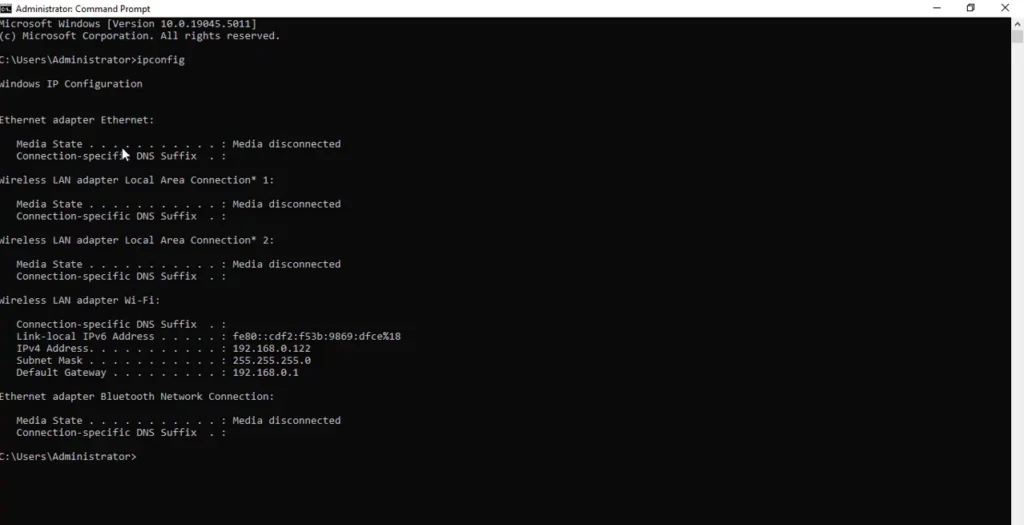
- Or press the Windows key, type cmd, press Enter, and run:
ipconfigLook for the IPv4 Address line under your active adapter. The Default Gateway line is your router’s address.
Mac (macOS Ventura or later)
- System Settings → Wi-Fi → Details… next to your connected network → TCP/IP → IP address.
iPhone / iPad
- Settings → Wi-Fi → tap the ⓘ next to your network → IP Address (under IPv4 Address).
Android
- Menus vary by phone maker. On Google Pixel: Settings → Network & internet → Internet → tap the gear next to your Wi-Fi network → IP address (sometimes under Network details).
Linux (optional)
ip addrLook for the inet line under your Wi-Fi or Ethernet interface (inet6 lines are IPv6).
Seeing 169.254.x.x? That’s a self-assigned “link-local” address. Your device gives itself one when it couldn’t get an address from the router’s DHCP. Restarting the router and reconnecting usually fixes it.
What an IP address reveals — and what it doesn’t
What it usually reveals:
- Your ISP (for example, that you’re on a particular cable company’s network).
- An approximate location — often a city or metro area, sometimes just a state or region. IP location comes from databases that estimate based on where an ISP’s address blocks are registered and used, and they can be off by many miles.
What it doesn’t reveal on its own:
- Your name.
- Your street address or exact location.
- Which person in a household was using the connection.
Who can link an IP to you? Only your ISP knows which customer account had a given public IP at a given time. In the US, ISPs generally hand that over only in response to legal process such as a subpoena or court order. Even then, it points to the account holder’s connection — not proof of who was at the keyboard.
Who sees your public IP? Every website, app, game server and online service you connect to, because they need it to send data back. That’s not a leak; it’s how the internet works.
Real (but modest) risks: someone who has your IP could flood it with traffic to knock your connection offline (a known problem in competitive gaming), or probe it for services you’ve left exposed. Keeping your router updated and not opening ports you don’t need covers most of this — see our homelab network security guide if you host anything at home.
What a VPN does: a VPN sends your traffic through an encrypted tunnel to a VPN server first, so websites see the VPN server’s IP address instead of yours. Your ISP can still see that you’re connected to a VPN, and the VPN provider can see your real IP. It changes who sees your address; it doesn’t make you invisible.
Can two devices have the same IP address?
It depends on where:
- On the same network: no. Two devices with the same private address on one network cause an IP conflict — one or both lose connection. It usually happens when someone sets an address manually that the router also hands out. Restarting the device (or running
ipconfig /releasethenipconfig /renewon Windows) gets a fresh DHCP address and usually fixes it. - In different homes: yes, all the time. Private addresses like 192.168.1.20 are reused in millions of homes by design.
- Publicly: yes, by design. Every device in your home shares your one public IPv4 address through NAT, and with carrier-grade NAT, many households can share one too.
Ready to check yours?
Search “what is my IP” to see your public address, then open your phone’s Wi-Fi details to see its private one. Now you’ll know exactly why they’re different — and why neither one is a problem.
Keep going:
- How to find your Wi-Fi password — including how to get into your router’s admin page.
- How to secure a homelab network — the next step once you understand private addresses.
- What is a smart home? — every one of those devices gets an IP address, too.
FAQ
What does IP stand for?
IP stands for Internet Protocol, the set of rules that defines how data is addressed and moved between networks. An IP address is the address format that protocol uses.
Does my IP address change?
Usually, yes — occasionally. Most home internet plans use dynamic IPs that can change after a router restart, an outage or ISP maintenance. Private IPs inside your home can change too. This is normal and is not a sign of hacking.
Is my IP address the same as my MAC address?
No. A MAC address identifies a device’s network hardware on the local network, and IP addresses are used to route data across networks. Many modern phones and laptops even use a randomized MAC address per Wi-Fi network for privacy.
Is 192.168.1.1 my IP address?
Probably not. 192.168.1.1 (or 192.168.0.1) is a common default address for the router on a home network. Your device has its own private address in the same range, and your home has a separate public address.
Can someone find my exact address from my IP?
Not from the IP address alone. It typically reveals your ISP and an approximate city or region. Only your ISP can match an IP to a customer account, and it generally does so only under legal process.
Does a VPN completely hide my IP address?
It hides your real IP from the websites and services you visit, which see the VPN server’s address instead. Your ISP still sees that you’re using a VPN, and the VPN provider can see your real IP.
Why do I have both an IPv4 and an IPv6 address?
Most networks now run both at once (“dual stack”). Your device uses IPv6 when the site supports it and falls back to IPv4 when it doesn’t.
What is a 169.254 address?
An address in 169.254.0.0/16 is “link-local”: your device assigned it to itself because it couldn’t get one from DHCP. It only works on the local network segment, so it usually means a connection problem. Restarting the router and device typically fixes it.
Sources and standards used
This guide was checked against the internet’s own standards documents: RFC 791 (IPv4), RFC 8200 and RFC 4291 (IPv6 and its 128-bit addressing), RFC 5952 (how IPv6 addresses are written), RFC 1918 (private address ranges), RFC 5737 and RFC 3849 (address ranges reserved for examples), RFC 2131 (DHCP), RFC 3022 (NAT), RFC 6598 (carrier-grade NAT shared space), RFC 3927 (169.254 link-local addresses), and IANA/ARIN records of the February 3, 2011 IPv4 free-pool depletion.